Checkout editorial · Bitcoin and VIP10
VIP10 and Bitcoin checkout: two separate cart adjustments
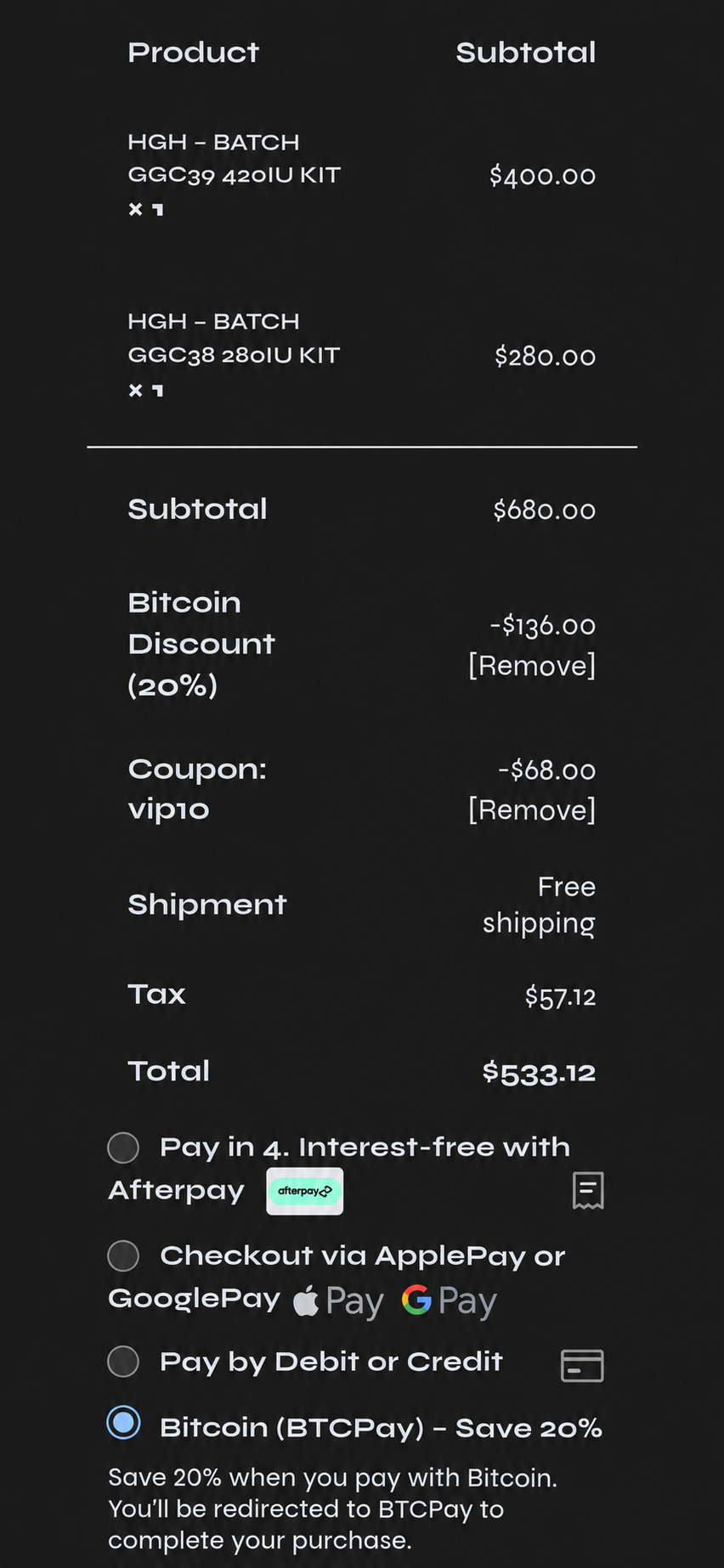
The supplied checkout record shows two visible reductions in one cart: a 20% Bitcoin promotion and a separate VIP10 coupon reduction. They are documented as separate adjustments, not as one combined code.

What the supplied record shows
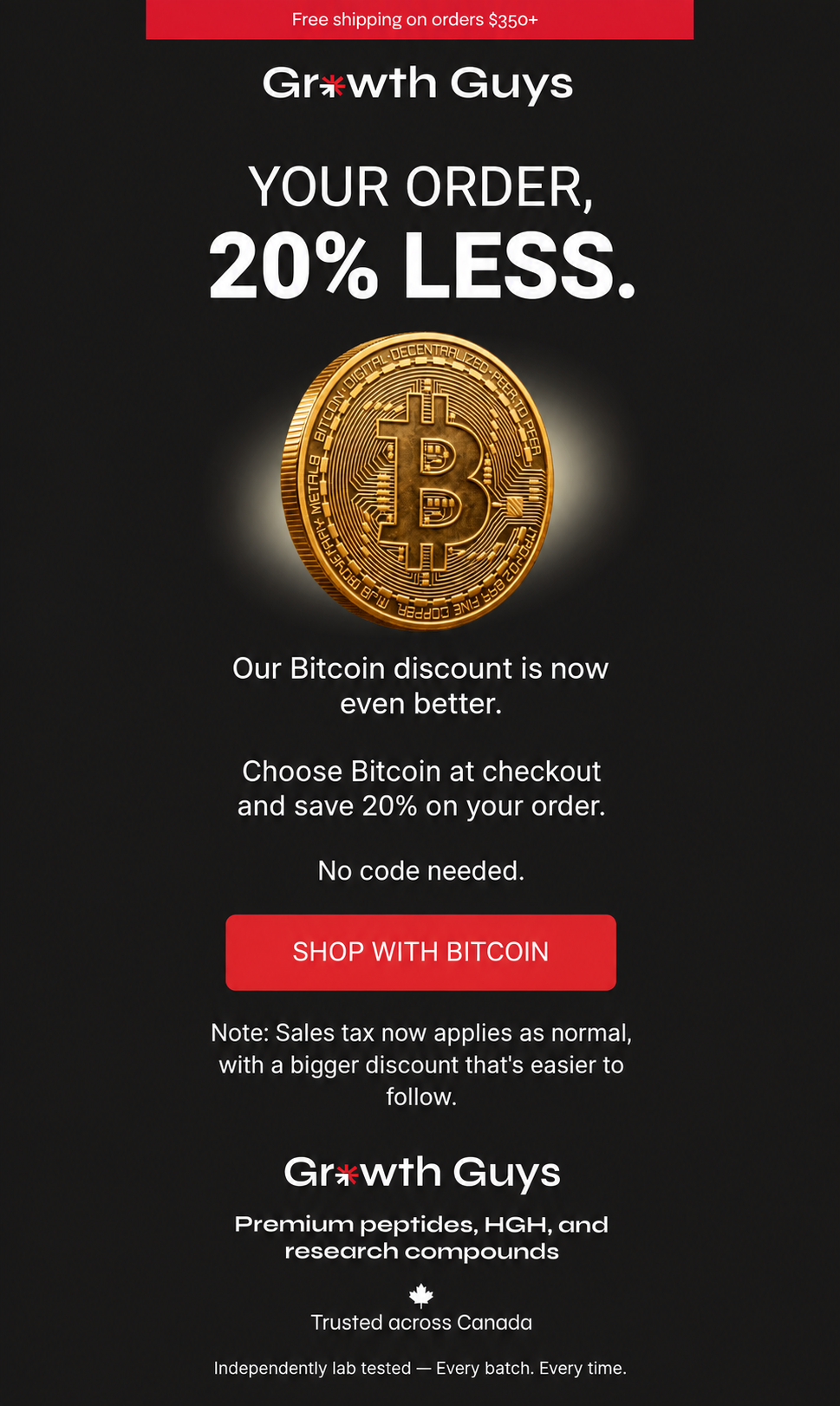
The newsletter says that selecting Bitcoin at checkout produces a 20 percent order discount, that no code is needed for that offer, and that sales tax applies normally. The associated cart example shows the Bitcoin reduction and the VIP10 coupon as separate visible checkout adjustments.
That distinction matters. The Bitcoin promotion is not described as VIP10, and VIP10 is not presented as the mechanism that creates the Bitcoin discount. The record documents their simultaneous display in one cart.
The recorded cart arithmetic
The displayed product subtotal was $680.00 CAD. The Bitcoin Discount 20 percent line was -$136.00 CAD, which equals 20 percent of $680.00. The separate Coupon: vip10 line was -$68.00 CAD, which equals 10 percent of the same subtotal.
Before tax, the two displayed reductions totalled $204.00 CAD. The cart showed free shipping, $57.12 CAD in tax, and a final displayed total of $533.12 CAD. These figures describe this recorded example; they are not a promise that every cart will produce the same result.
- Product subtotal: $680.00 CAD
- Bitcoin discount: -$136.00 CAD (20% of the displayed subtotal)
- VIP10 coupon: -$68.00 CAD (10% of the displayed subtotal)
- Shipping: free shipping
- Tax: $57.12 CAD
- Final displayed total: $533.12 CAD
How VIP10 and the Bitcoin promotion differ
VIP10 is the coupon entered into the cart’s coupon field. In the supplied example, its own line shows a $68.00 CAD reduction. The Bitcoin promotion is tied to choosing Bitcoin or BTCPay at checkout and is shown as a separate 20 percent savings line.
The payment area in the evidence card shows Bitcoin (BTCPay) selected and describes the option as saving 20 percent. Availability, payment routing, product eligibility, shipping, taxes, and promotion stacking can change, so the live cart remains the appropriate place to confirm the current presentation before payment.
How to check the current cart
Add the intended items to the merchant cart. Enter VIP10 in the normal coupon field and confirm that its line item appears. Where Bitcoin or BTCPay is available, select that payment option and review whether a separate Bitcoin discount line appears. Finally, read the shipping, tax, and total lines before taking any payment or checkout action.
A different cart result is possible because prices, inventory, eligibility, payment availability, tax treatment, shipping rules, or promotions may change. Do not force a result or bypass a storefront control when the live cart differs from this example.
Record scope
This article documents a pre-payment cart observation. It does not establish that an order was placed, that Bitcoin payment completed, that fulfillment occurred, or that the promotion is permanent for every cart. Its narrower purpose is to show the visible checkout treatment of the VIP10 coupon alongside a separate Bitcoin promotion in the supplied example.